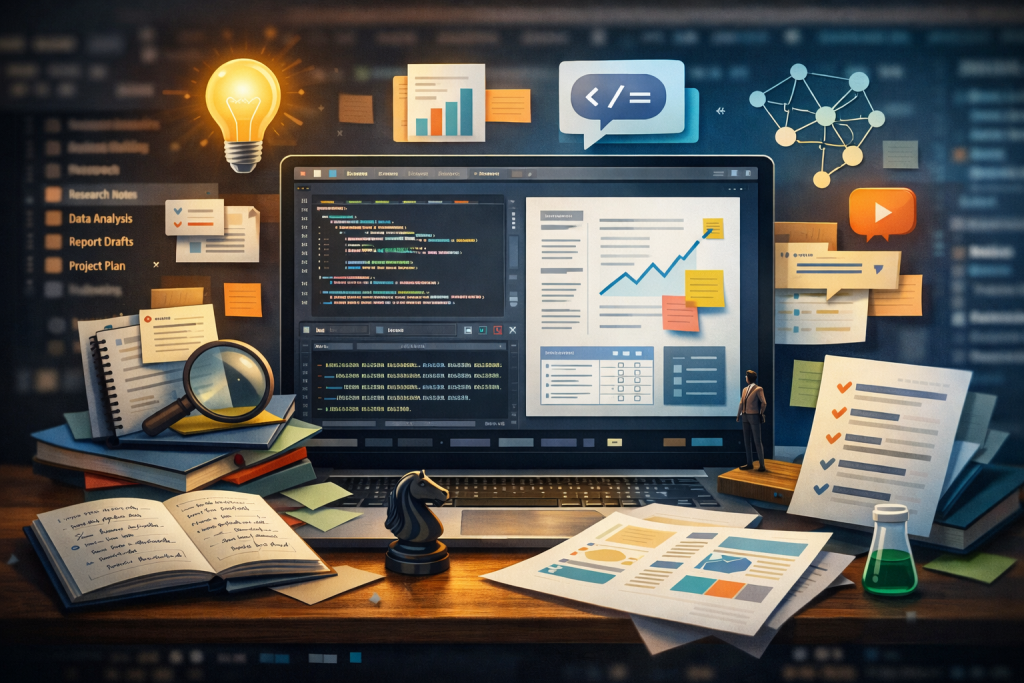
Digital illustration of a laptop displaying an integrated development environment (IDE) with code on the left and a document with charts on the right. Surrounding the screen are research notes, sticky notes, data visualizations, a magnifying glass, books, and icons representing ideas, networks, and media, symbolizing an AI-powered workspace that integrates coding, research, writing, and analysis in one environment.

Coding Agents Aren’t Just for Code

Coding agents don’t have to be just for writing code. At their core, they’re for building repositories of knowledge—and that changes what’s possible for anyone doing any sort of complex knowledge work, not just software engineers.

Matt Shumer’s viral post, “Something Big Is Happening,” laid out a stark timeline: AI labs focused on coding first because code is the lever that builds better AI. Software engineers were the first to feel the ground shift—not because they were the target, but because they were standing on the launchpad. Shumer describes telling an AI what he wants, walking away for four hours, and coming back to a finished product. No corrections needed.

He’s right about the trajectory. But there’s a dimension he and most commentators are missing—one that matters especially for the rest of us who aren’t software engineers. The real power of coding agents isn’t that they do work for you. It’s that they let you build a persistent base of knowledge you can think with over time.

I came to this from a different angle. I’m not a software engineer, but I spent over a decade managing technology projects at the National Democratic Institute and on Capitol Hill. My job was translating between technical teams and institutional stakeholders, not writing the code myself.

Then I got laid off, and the usual buffers disappeared—no team to rely on for technical advice, no vendors to turn to for support, no sprint cycles limiting the scope of what I could do. I started using coding agents because I had real problems to solve and no one to hand them to. But I also had a genuine curiosity about a field moving faster than anything I’d seen in my career. That curiosity has since shaped my consulting work—projects ranging from AI bias assessment to open-source civic tech.

What I found surprised me. The coding agent wasn’t just helping me write code. It was giving me a workspace where I could load reference documents, build on previous sessions, and develop structured thinking across weeks of work—something no chatbot had ever offered. It was the first AI tool that felt less like a novelty and more like a genuine working environment. That experience is what convinced me that these tools represent an unlock that most people outside of software engineering don’t yet realize is available to them.

What is a Coding Agent Anyway?

If you haven’t used one, a coding agent is an AI that operates inside an integrated development environment (IDE)—the software workspace where code is written, run, and debugged—where it can read, write, and modify files across an entire project. Tools like Windsurf and Cursor connect to frontier models from OpenAI and Anthropic via their APIs, giving you a conversational interface that can see and manipulate your whole workspace.

If you’ve only used ChatGPT or Claude through a chat window, this is a fundamentally different experience. In a chat, the AI’s memory lives in the conversation. When the conversation ends, the context is gone. You start fresh every time. The model might remember what you said ten messages ago, but it has no persistent, structured understanding of what you’re building outside of the conversation. Some chatbots get around this by curating a notepad of your previous conversations—but that’s frequently done without your knowledge or input, and the result is a lossy, opaque summary rather than a structured body of work you control.

In an IDE, the memory lives in the repository. Every file, every folder, every document you add becomes part of a growing body of context that any new session can draw on. You’re not just having a conversation—you’re developing a running knowledge base that you can feed back into the next session, or hand to a different agent entirely. Multiple agents can work on the same project. The context accumulates rather than evaporating.

This is the difference between in-context learning—the AI’s ability to use what you’ve told it within a single conversation—and building a repository of knowledge. In-context learning is powerful but ephemeral: the model gets smarter within a session but starts from zero the next time. A repository is persistent. It compounds.

The Offloading Trap

Not all AI tools get this right. I recently tested Airtable’s Superagent for building a presentation. The tool is autonomous by default: it generates output through a lengthy thinking process, but when I tried to shift from “generate a draft” to “collaborate on refinements,” the system resisted. It defaulted to its own style, rolled back toward its preferences, and didn’t give me an editable output I could iterate on. I spent more time reacting to the AI than thinking with it.

The problem wasn’t capability—it was interaction design. Superagent optimized for cognitive offloading: hand over the task, get back a finished product. That works when you want a first draft you don’t care much about. It fails when accuracy, framing, and judgment matter—which is most of the time in professional work.

Coding agents solve this problem architecturally. Because the output lives in files you can see, edit, and version-control, the collaboration model is fundamentally different. The AI proposes changes; you accept, reject, or modify them. Each round builds on what’s already there. It’s closer to working with a colleague than delegating to an assistant—a shift I described in “The End of the Product Manager (As We Knew It).” The tracked-changes, diff-based workflow I suggested to the Superagent team? That’s just how coding agents already work.

The Current Moment

Shumer’s post captures something important about where we are: the AI labs built coding capability first because it’s the flywheel that accelerates everything else. AI that writes code can help build the next version of itself. OpenAI’s GPT-5.3 Codex was, by their own account, “instrumental in creating itself.” The recursive loop is already running.

Here’s what that means for everyone else. The frontier labs are pouring resources into making coding agents better—not just because they want to automate software engineering, but because the coding agent paradigm is the most powerful interface they’ve found for AI to do complex, multi-step, persistent work. The investment in coding agents is, in effect, an investment in the general-purpose AI workspace. Software engineers are the first to benefit, but the architecture is domain-agnostic—and already accessible to anyone willing to try it.

The repository model doesn’t care whether the files contain Python scripts or policy analysis. It works the same way. And as these tools improve—as the models get better at judgment, at synthesis, at maintaining coherence across large projects—the gap between “coding agent” and “knowledge work agent” will close entirely.

What This Looks Like in Practice

I’ve been using coding agents for work that goes well beyond shipping software:

  • Research synthesis: Loading a project with dozens of source documents—reports, articles, transcripts—and asking the agent to identify patterns, contradictions, and gaps across the full corpus.
  • Data analysis: Cleaning, transforming, and exploring datasets directly in the workspace—writing scripts to normalize messy data, generate visualizations, or test hypotheses, all within a project that retains the logic and context between sessions.
  • Writing and editing: Drafting in a repository where the AI can reference my previous work, style preferences, and source material simultaneously, then proposing edits I can accept or reject line by line.
  • Structured analysis: Building frameworks and templates that persist across sessions, so each new analysis builds on the last rather than starting from scratch.
  • Knowledge management: Developing living documents that accumulate institutional knowledge in a format that’s both human-readable and AI-accessible.
  • Building applications: And yes, coding agents are also for coding. I’ve used them to build web applications, wire together APIs, and deploy tools—work I previously would have contracted out. You don’t need to be an engineer; the agent handles the implementation while you focus on what the tool needs to do.

Most of this doesn’t require writing code. What it requires is understanding that the IDE is a workspace, not just a code editor—and that the repository is a knowledge base, not just a codebase.

The Honest Version

Shumer writes that he kept giving people “the polite version” of what’s happening with AI, “because the honest version sounds like I’ve lost my mind.” I know the feeling. But I’m also not prepared to hand over my agency to AI—and my honest version is about a different gap: the most powerful AI collaboration tools available right now are coding agents, and most people don’t yet realize they’re available to anyone, regardless of technical background.

Here’s what I want people to take away: you can build a workspace where AI thinks with you over time, not just in a single conversation. That’s what a repository gives you. And the tools to do it—coding agents—are available to anyone right now, for the cost of a subscription. You don’t need to write code. You don’t need a technical background. You just need to open the door.
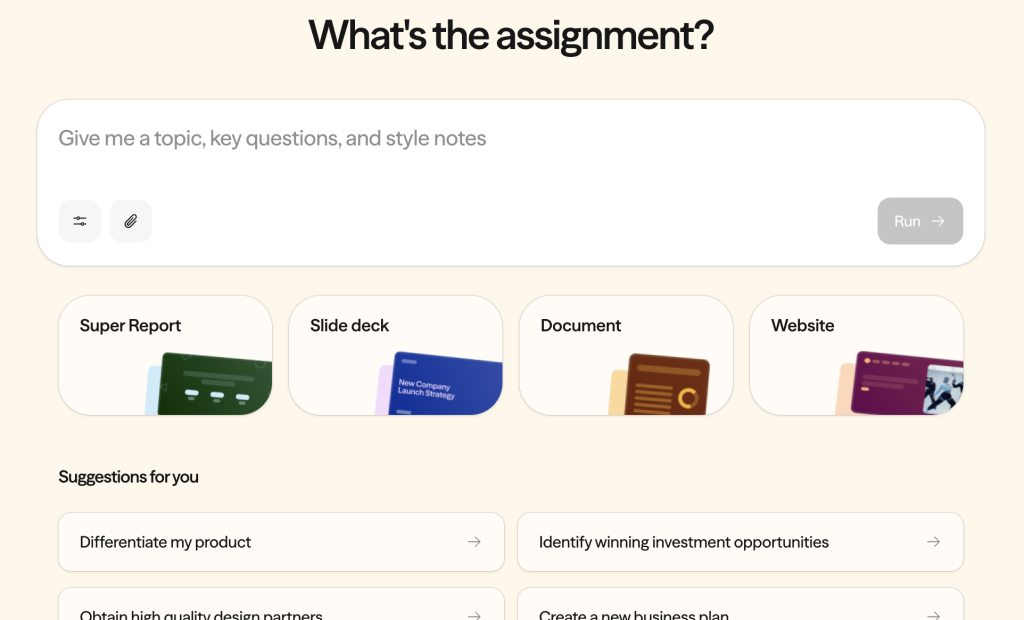
A screenshot of the Superagent website.

TIL: Superagent Slide optimizes for offloading, not collaboration

I got invited into Airtable’s Superagent beta, and my first idea was simple: use it to help build a presentation I was already preparing for. The request was constrained (short, structured, meant to be presented) and in a domain where accuracy and framing matter—so it felt like a good test of whether Superagent could help with real work, not just brainstorming.

Afterwards, the Superagent team reached out and invited feedback. He couldn’t join the call in the end, but I spoke with his product manager. It was useful—I could share what worked, where things broke down for me, and a few broader questions about bias, alignment, and trust (beyond whatever guardrails exist in the underlying third‑party models).

Here are the takeaways:

1) Autonomy by default can slide into cognitive offloading

Superagent was helpful at the start. It generated structure quickly and surfaced a couple angles and graphic designs I might not have considered on my own. Autonomy-by-default may be genuinely useful when you want to offload early drafting. The issue for me was shifting from ‘generate a draft’ to ‘collaborate on refinements.’ I struggled to generate something I could confidently present. Superagent repeatedly defaulted to a pitch-style, narrative deck. Once the system committed to a mode, it was hard to steer, and without an editable output (or something like tracked changes/diffs), I spent more time trying to refine my initial prompt than iterating.

I ultimately ended up running Superagent Slides as seven separate tasks (each one taking about 5 minutes to complete) as I improved my prompt. Trying to refine the deck within the same task didn’t work. Each refinement took another 5-10 minutes and it often felt like the output rolled back toward the system’s defaults rather prioritizing my preferences.

The biggest barrier to using Superagent for collaboration was simpler: the final deck didn’t come out in an editable format, and I couldn’t export output in Google Doc or Powerpoint to make edits. Without being able to make normal edits, it was essentially unusable for my presentation workflow.

Net result: I spent more time waiting for and then reacting to output than thinking with the tool. That may be fine for users who want a more autonomous generator, but I was expecting the AI to act as a partner.

What I suggested to the product manager was is a more collaborative approach—closer to how code-editing tools handle changes: show proposed edits clearly (tracked changes / Git-style diffs), let me accept or reject selectively, and let each round build on what’s already working.

2) A few basics also got in the way

Even setting content aside, a few practical issues made the output harder to use:

  • inconsistent hierarchy and styling across slides
  • text density/sizing that wasn’t presentation-safe or accessible

These are solvable, and may simply reflect where the product is in its maturity curve. But they matter because they determine whether you can use what it generates under deadline.

3) As tools get more autonomous, trust and safety become basic product quality

We also talked about bias and reliability in higher-risk domains. I shared IFIT research suggesting models perform better in conflict contexts when prompted to do basic “sanity checks”: ask clarifying questions, surface contingencies and trade-offs, disclose risks, and take sequencing seriously.

One thing I left unsure about is how Superagent is approaching bias/alignment/trust & safety at the product layer (beyond whatever guardrails exist in underlying models). If it’s on the roadmap, I’d love to see how they’re thinking about it—this is the kind of capability that’s easier to build in early.

Final thoughts

The product manager encouraged me to try Super Report, which she said is more developed. I plan to—partly because reports may naturally be easier to revise than slides.

She also said making presentations editable is already a roadmap priority, which is an important step toward making the workflow feel more collaborative.

If I zoom out, the part that stuck with me is how often AI products still treat cognitive offloading, model bias, and accessibility as secondary concerns. Those three things aren’t edge cases; they’re the difference between something that’s impressive in a pitch deck and something that’s safe and usable in the real world.

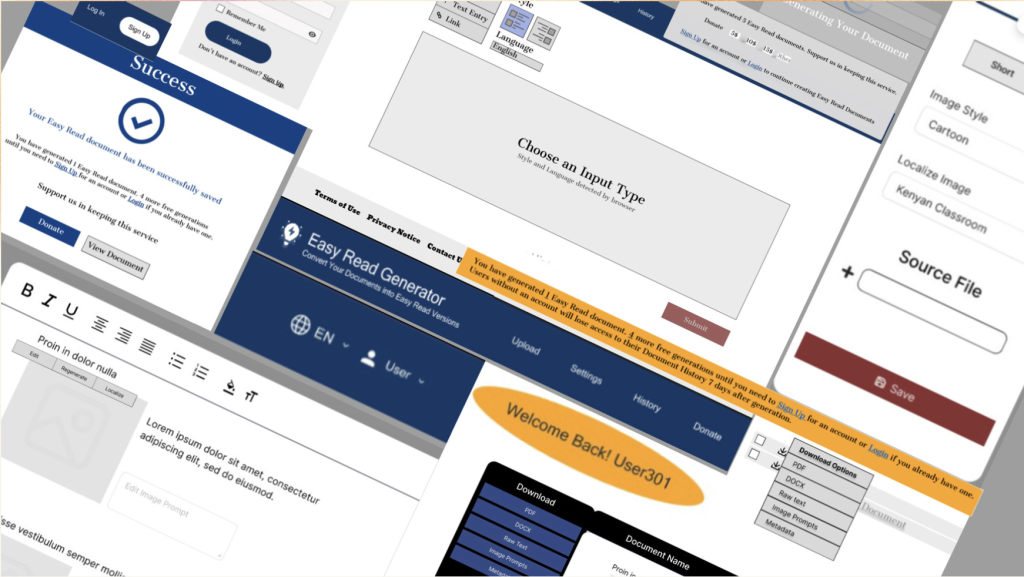
A mosaic of prototype screens from the Easy Read Generator redesign—an accessibility-focused civic tech tool reimagined by UMD students to better serve users with diverse cognitive and digital literacy needs.

Forked, Not Finished: Mentoring Civic Tech the Open Source Way

This spring, I had the opportunity to support several student-led civic tech projects through the University of Maryland’s iConsultancy program. The partnership was originally facilitated through my role at the National Democratic Institute (NDI), but when NDI’s participation was disrupted by a sweeping freeze on U.S. foreign assistance programs, I continued advising the students in a personal capacity.

What started as a straightforward mentorship experience became a much more fluid—and in some ways more meaningful—engagement, shaped by shifting roles, student initiative, and a shared interest in public-interest technology. In many ways, it reminded me of the spirit of open source: people stepping in, adapting to change, and contributing however they can. NDI itself has long embraced open source platforms like Decidim and CiviCRM as part of its commitment to digital democracy—tools that reflect the values of transparency, adaptability, and shared ownership.

Three Projects, Three Distinct Challenges

Each iConsultancy team focused on a different scope of work—specifically related to Decidim, an open-source platform for democratic participation, and a new tool that NDI was designing to make information more accessible to people with intellectual disabilities. These projects were all rooted in the open source ethos: building in the open, iterating in real time, and aiming for impact beyond the immediate team.

1. Decidim Alternate Deployment Methods

This team explored ways to simplify and modernize how Decidim is deployed across different environments. The official Heroku option had become outdated, and the manual installation process was prohibitively complex for non-expert users.

The students conducted a technical evaluation of Docker and Heroku deployment methods, tested them across operating systems, and ultimately created an updated Docker configuration tailored for production environments. Their contributions were submitted to the Decidim GitHub repo. These additions make it significantly easier to deploy Decidim in a production environment using Docker Compose. Like many open source contributions, their work advanced on community-maintained tools, with the potential to be picked up and improved by others.

2. Easy Read Generator UX Redesign

The second team focused on redesigning the user interface for NDI’s Easy Read Generator project, a tool that simplifies complex civic documents to make them more accessible for individuals with intellectual disabilities and those with lower literacy levels.

Drawing on user research, accessibility guidelines (like WCAG), and competitive analysis, the students developed a high-fidelity prototype and detailed UX recommendations. While I had envisioned an iterative redesign of existing wireframes, the team pushed the concept further—exploring new features such as login options and donation functionality. Their willingness to experiment expanded the conversation about what this tool could become. 

3. Manual Installation Documentation Enhancements

The third project aimed to unify and improve Decidim’s manual installation documentation. English-language instructions were incomplete, and more robust Spanish-language documentation had yet to be translated or standardized.

The team was tasked with consolidating and testing these disparate guides, streamlining the process for deploying Decidim with all its intended features. Documentation is the connective tissue of any open source ecosystem, and while this team faced challenges in delivering their final product, the importance of the task—and the gaps it sought to fill—remains clear.

Lessons from the Field

Each project reflected the realities of open collaboration: sometimes productive, sometimes messy, always instructive. The teams that stayed organized and engaged produced genuinely useful outputs that could be built upon by others. In other cases, student groups struggled to balance their workload or needed more support to stay aligned with the project’s goals.

To be clear, this isn’t a critique of the iConsultancy model—student-led learning is, by design, exploratory. But like any open source initiative, success is rarely the result of individual effort alone. It depends on a thoughtful mix of initiative, shared norms, and an ecosystem of support. Civic tech projects, especially those aiming for real-world relevance, demand a working knowledge of community context, accessibility, and technical infrastructure—all challenging to fully absorb in a single semester. And just as open source contributors rely on documentation, mentors, and community to navigate complex codebases, student teams benefit from structured feedback, clear goals, and a culture that rewards asking questions. Those ingredients can turn short-term projects into lasting contributions.

Why I Stayed

Even after my layoff from NDI, I chose to remain involved because my commitment to the projects didn’t depend on a formal title. The UMD students brought real energy and fresh ideas. And continuing to mentor them gave me a sense of continuity and purpose at a time when many other structures were unraveling.

In civic tech, we often talk about resilience, distributed leadership, and decentralization. These principles are foundational to the open source ecosystem, where no single person or entity controls the project and leadership often emerges organically from contributors. This experience reminded me that these values aren’t just theoretical—they show up in how we navigate change. Open source projects are a fitting metaphor: they can survive the loss of their initial stewards, thriving as new contributors pick up the thread. Our work, too, can have a life beyond any single job or institution. Even when a formal role ends, the ideas, tools, and momentum we create can continue evolving—adapted, expanded, and reimagined by others who care.

Using AI to Strengthen Democratic Inclusion

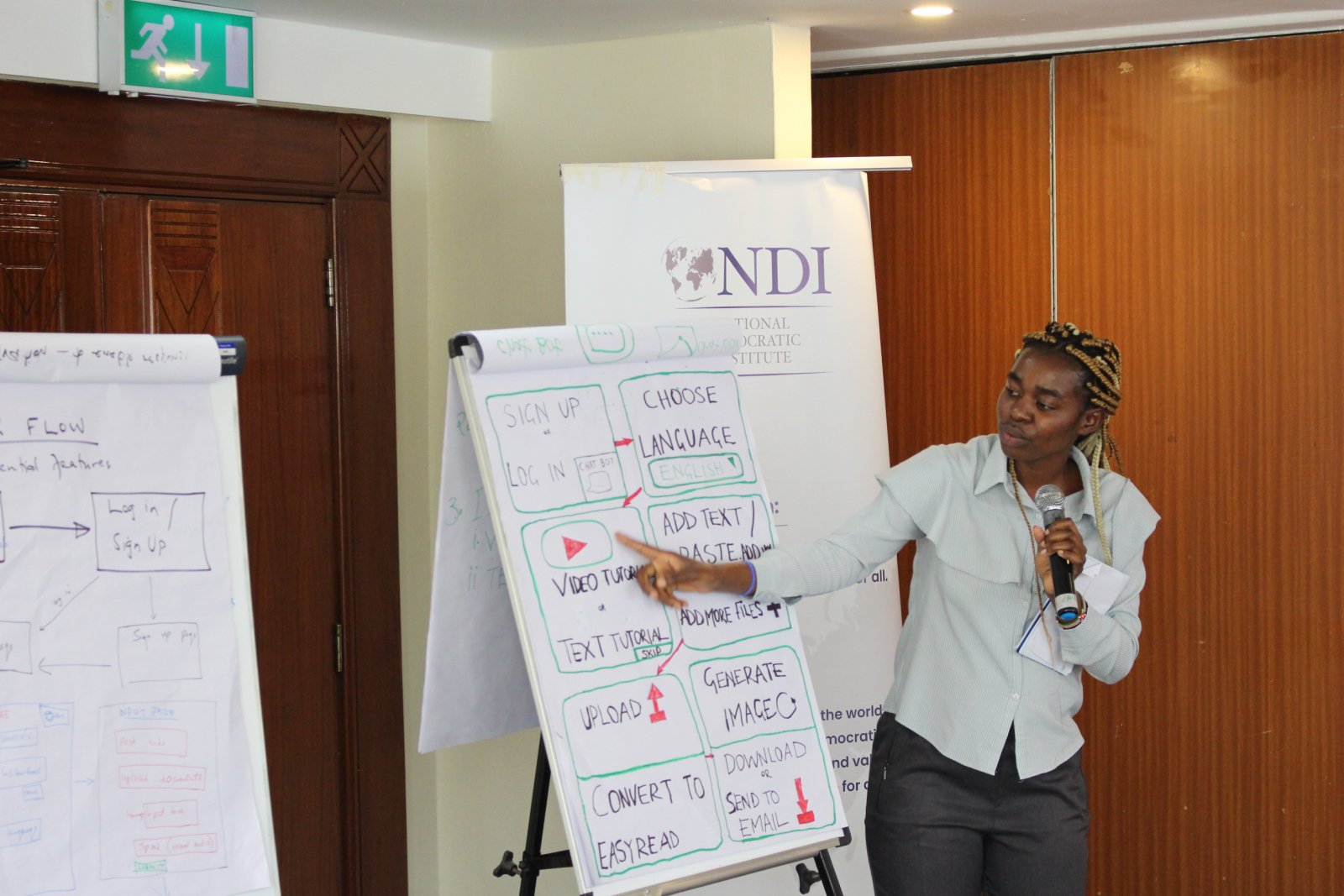
Participants develop a list of features they would like to be included in an Easy Read generator tool. They then used this list to design a prototype tool.

From the 15 percent of people around the world who live with a disability, 8 in 10 reside in developing countries. Although Article 21 of the United Nations Convention on the Rights of Person with Disabilities (CRPD) grants them the right to accessible information, people with disabilities often face communication barriers due to a lack of information accessibility. Access to information is essential for democratic and political participation, which enables people to make informed decisions and influence policies that affect their lives. If people with intellectual disabilities have greater access to easy-to-read information on political processes or policies and the necessary assistance using it, they will be better equipped to advocate for themselves and participate in democracy. By reducing communication barriers through Easy Read and other accessible formats, societies can foster inclusion, making it possible for people with disabilities to engage fully in civic life.

With these circumstances in mind, the National Democratic Institute (NDI) organized a two-day workshop in Nairobi, Kenya, to bring people with intellectual disabilities, caretakers, civil society representatives, government officials, and accessibility experts together to test and design tools for creating Easy Read documents. The workshop began by reviewing the results of a remotely-conducted activity to test assumptions about how to best address barriers to accessible information in Kenya. Participants then explored the possibility of using generative AI tools, like ChatGPT, to facilitate the creation of accessible information. To ensure that everyone could participate, NDI provided accessibility accommodations, such as sign-language interpretation, an expanded time frame agenda to allow for ample participation, and illustrations to enhance comprehension and retention.

Easy Read is a method of presenting information in an easy-to-understand format. Easy Read materials are especially beneficial for people with disabilities, those with low literacy levels, non-native language speakers, and individuals experiencing memory difficulties. Easy Read combines short sentences that are clear and free of jargon with simple images to help explain the written content. Easy Read is essential not only for people with intellectual disabilities but also for making information accessible to everyone, particularly in a democratic society. Accessible information enables all citizens to participate in civic processes, make informed decisions, and understand their rights and responsibilities. By utilizing Easy Read, NDI seeks to support inclusive democratic participation and enable people to actively engage in their communities.

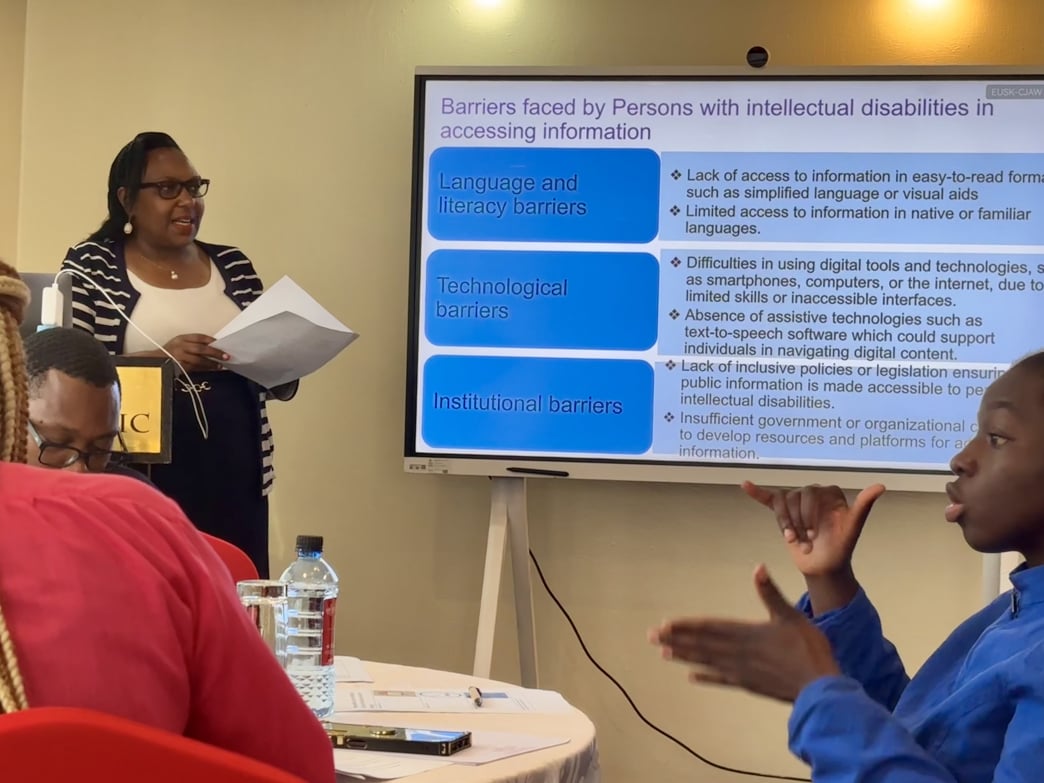
Alice Mundia, Chairperson of the Differently Talented Society of Kenya (DTSK), discusses barriers faced by persons with intellectual disabilities, specifically with regard to accessing information.

Twenty representatives from various disabled people’s organizations (DPOs) and other civic groups contributed their diverse perspectives and expertise to advance information accessibility in Kenya. These groups included the United Disabled Persons of Kenya (UDPK), the Kenya Association of the Intellectually Handicapped (KAIH), Kenya ICT Action Network (KICTANet), Differently Talented Society of Kenya (DTSK), Black Albinism (BI), Ubongo Kids, Down Syndrome Society of Kenya (DSSK), Kenya Sign Language Interpreters Association (KSLIA), the Kenya National Association of the Deaf (KNAD), and the Directorate of Social Development under the Ministry of Labour and Social Services. The event fostered collaboration and laid the foundation for further development of accessible digital tools in the country.
On the first day, participants reflected on the structural challenges that restrict access to information for people with intellectual disabilities. Alice Mundia, Chairperson of the Differently Talented Society of Kenya (DTSK), led a discussion on the barriers to creating and distributing Easy Read materials. Participants then explored NDI’s Easy Read website, provided feedback on navigation and usability, and used generative AI tools to draft Easy Read documents. Working in small groups, they refined these drafts, exploring the potential and challenges of using AI for accessible content creation.

“I wish I knew about this before. This will help a lot,” said a teacher who supports students with Down Syndrome. “I struggle to break down complex jargon into understandable information. With this tool, that work becomes easier.”

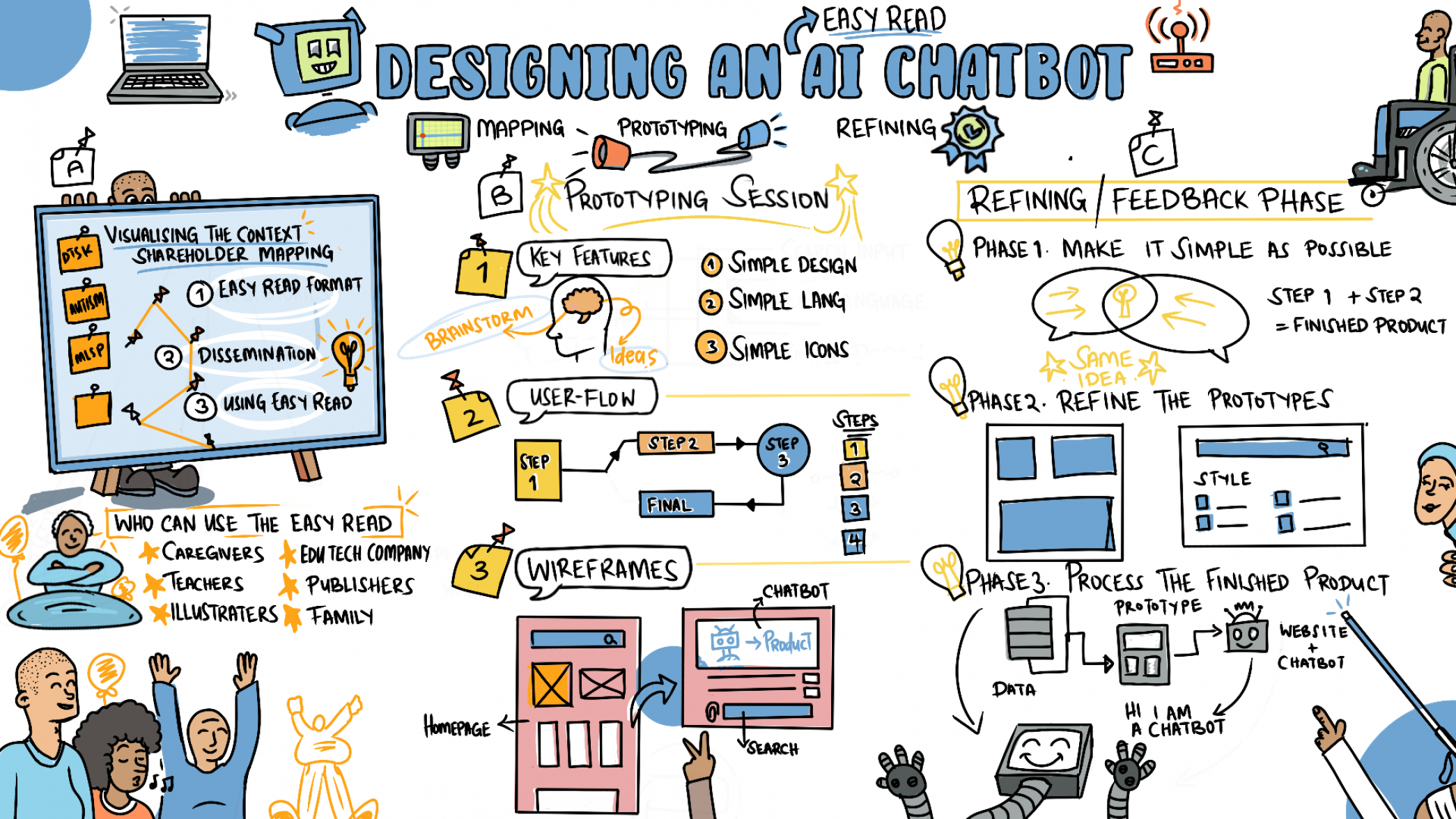
During the second day, participants focused on mapping key stakeholders involved in creating and disseminating Easy Read documents and developing a prototype for an Easy Read Generator tool. Participants collaborated to design user flows, interfaces, and features for the tool by sketching visual prototypes. This hands-on session ensured that the tool would meet the diverse needs of people with intellectual disabilities and their supporters. The concept for an Easy Read Generator originated during a pitch competition in 2021, where NDI staff proposed tech solutions to democracy challenges. The winning idea, the “Right To Know” project, envisioned an Easy Read translator, anticipating the development of generative AI technologies like ChatGPT, which has enabled computers to simplify complex documents quickly.

Through the workshop, participants found that while ChatGPT is a powerful tool for generating and simplifying text, the unpaid version has several limitations that hinder its generation of accessible content. These include browsing limitations and the inability to upload documents or generate images. 

Following this workshop, NDI has begun exploring two avenues to address these limitations and improve access to accessible information for people with intellectual disabilities. First, NDI is reaching out to companies that provide Generative AI chatbots to explore the possibility of allowing NGOs that support people with intellectual disabilities to access paid services for free or at a reduced cost. Such a program could enable disability rights advocates, caregivers, and organizations to leverage the most advanced tools to generate Easy Read content. This would significantly enhance their ability to reach and support individuals who depend on these accessible materials.

NDI is also exploring avenues for developing the prototype Easy Read Generator that participants designed into a working application through future programs. This tool would not only improve the experience of using Generative AI tools to create Easy Read documents, it could also be offered for free to select partner organizations, eliminating cost as a barrier to generating easy-to-read information. 

This illustration captures the second day of the workshop, which focused on designing an Easy Read AI chatbot.

Through this workshop, participants from diverse backgrounds collaborated to explore generative AI’s potential for making information accessible for all. The workshop provided an invaluable opportunity to address challenges, share insights, and develop solutions. NDI remains committed to expanding these programs to ensure that all citizens have access to information in formats they can understand and use.

Author: Jesper Frant, Senior Technology Projects Manager for NDI’s Democracy and Technology team

NDI’s engagement with this program is implemented with the support from the National Endowment for Democracy (NED) program.

Related Stories 

Early Intervention is Showing Girls that Politics is for Them

Persons With Disabilities Enhance Civic Engagement in Jordan

Partnering with the Disability Community and Parliament to Promote Inclusion

###

NDI is a non-profit, non-partisan, non-governmental organization that works in partnership around the world to strengthen and safeguard democratic institutions, processes, norms and values to secure a better quality of life for all. NDI envisions a world where democracy and freedom prevail, with dignity for all.

This story was originally posted on ndi.org.

How Smart Automation Can Be Used In International Development

This article was originally posted on NDItech.org.

Artificial Intelligence is one of those buzzwords in tech that everyone’s heard, but few people actually understand how it can be used in practice. If you’re to believe Hollywood or Stephen Hawking, AI either means androids that are indistinguishable from humans (except for the inability to use conjunctions) or super-intelligent computers that could spell the end of the human race. After attending a Tech Salon on how AI can be used in international development, I can say with absolute certainty that it is neither of those things… yet. But the “commodification” of AI is making “smart automation” — a term I quite liked as a useful synonym for AI — much more accessible outside Silicon Valley. In fact, you probably already used some form of AI today without even knowing it.

Before we get into how AI can be used in international development, let’s first understand for what type of things smart automation can and can’t be used. These capabilities or limitations can be broken down into three categories.

First, computers can now be trained to automate human intelligence. In other words, we can now train computers to do simple tasks that only humans used to be able to do — things like find which photos in your photo album have cats in them. This is a learning process whereby a human sorts out cat photos and a machine-learning algorithm (another tech buzzword) builds its own model to automate the process of finding cat photos.

Second, smart automation is only really useful as a way to augment human ability; it does not replace humans wholesale. AI is really good at classification and prediction, but it will never be 100 percent accurate. You still need a human to monitor the results, check for bias and make judgment calls.

Ok, so, now that the AI found the cat photos, it’s up to you — human — to exclude the one that is just a realistic-looking cat-shaped slipper (how’d that get in there?!?) and post the cutest, most relevant one as your animal shelter’s Facebook cover photo. We’re trying rescue kittens, not sell cat slippers…silly computer.

Finally, computers are way better than humans at doing simple, mundane tasks over and over without error or referencing vast databases of complex information. Smart automation is, therefore, a pathway to scale.

The cat example doesn’t work quite as well in this case so I’m going to dispense with that metaphor and instead turn to a real-life problem. There are simply too few doctors in Nigeria, and — given the size of the population and its rate of growth — it will be generations before we can train enough doctors. Smart automation has been shown to be surprisingly accurate at diagnosing medical ailments. Combining AI-assisted diagnosis with community health workers — who require way less training than a doctor — could be an important pathway to scaling access to medical services in places like Nigeria.

So how would an organization like NDI get started in smart automation? The Tech Salon folks recommended starting with a mid-scale pilot project tied to metrics for success and getting top-down institutional buy-in. But for me, the “how” is way less important than the “what.” In other words, selecting the right pilot project based on previously successful use cases is way more important than the size or institutional buy-in of the pilot. Also, your organization should probably have the capacity to support “dumb automation” — automation that doesn’t employ machine learning algorithms — before it makes the leap to supporting smart automation.

NDI is currently looking for ideas on an appropriate pilot project for smart automation. If you have ideas, you can email me at jfrant [at] ndi [dot] org (<= hoping the AIs aren’t smart enough to read that… yet).